
This post was most recently updated on August 1st, 2016

Learn “How To Put Screen Capture Video On Your Blog | And Why” in order to give your blog a more interesting look.
The information you give people in your blog posts is great.
Still, people will not just want to visit your blog because of the information you share, but because it has an appealing look to it.
I’m sure you know the saying “you can’t tell a book by it’s cover.”
Nonetheless, books often get sold on the basis of their covers.
I’ll bet you never heard of the book “Ba! Ba! Black Sheep,” nor have you seen it’s rather drab cover design meant topromote it as a historical novel.
But, I’ll also bet that you HAVE heard of the book “Gone With The Wind,” as well as the movie, the soundtrack and everything else related to it. You probably get an instant mental image of the cover and movie poster of Scarlett O’Hara and Rhett Butler in close embrace. This cover was meant to promote the book as steamy romantic novel.
Special: Get My FREE “Using Screen Capture Video On Your Blog” Training Guide
The thing you might not have know is that “Ba! Ba! Black Sheep” is the same novel as “Gone With The Wind” only re-released with a substantial makeover.
No, you can’t tell a book by it’s cover.
But the cover is still probably one of the main reasons you’ll buy it.
Dressing Up Your Blog
Using screen capture video is probably one of the easiest ways to make your blog look a lot spiffier and more professional.
It can be used to support your article, and make it more visual.
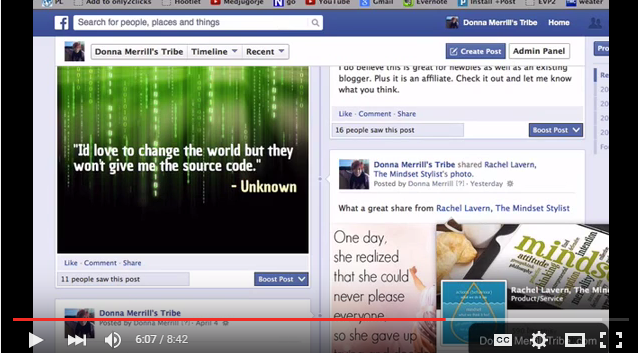
All you really want to do is to take the main idea of your blog and put it into a video.
Of course, you can do that with a face to camera video as well, but there is good reason to put screen capture on your blog instead.
1. One reason is that you obviously don’t have to be in front of the camera.
For many people, this is a big deal because they just don’t like seeing themselves in video.
So they avoid video altogether.
That’s really a shame because nothing gets people’s attention and holds their retention more than video.
Screen capture video helps you leapfrog over that snag.
Special: FREE Guide… 4 Things I Did To Build My Blog Using Only Free Traffic
It’s video, but you can stand invisibly in the background.
Some people don’t even like to hear their recorded voice, so you can actually shoot screen capture videos without even speaking. Just use some text points, background music or anything that seems appropriate.
2. Another reason to use screen capture video on your blog is that it is a moving visual presentation.
If you’re just sitting in front of the camera, after a short time, people could lose their focus and interest in the topic.
Because the screen capture continually jumps from one image to another, people are riveted to your presentation and locked in to your message.
3. The most obvious reason to use screen capture video is that it breaks up a text heavy article.
Bloggers know that it’s smart to use bold headlines, bullet points, color and white space to break the intensity and tedium of endless lines of text.
One of the best ways to do that is with the insertion of screen capture videos.

Screen Capture Video On Your Blog Give You Personal Branding
You want people to know that you are unique.
You want them to know you are a leader in your field and an authority to follow closely.
When you write a blog post with lots of information, you probably won’t leave much of an impression on people.
Information is only information.
But your screen capture video gives it personality… your personality… even if it’s only through your voice of text captions.
People forget information quickly, but they are much more likely to remember the images, the voice, the personality behind them.
By using screen capture video on your blog, you rise above anonymity.
You become a real person.
You are now someone that your readers have “met” and would like to engage with.
It’s one of the best ways to start building a relationship with your visitors.
Special: Get My FREE “Using Screen Capture Video On Your Blog” Training Guide
People don’t join your email list or bookmark your blog because they like your information.
They do it because they like you.
They won’t like you until they get to know and trust you.
That’s the real power of screen capture video.
It’s all about building your personal brand.
How To Put Screen Capture Video On Your Blog | And Why
Well, we’ve given you some good reasons why you should put screen capture video on your blog.
Learning how to do it is pretty simple.
You start by getting a good screen capture software.
There are both paid and free screen capture softwares available for either PC or MAC.
Just do a Google search and you’ll find them pretty easily.
Once you’ve downloaded the software, just open a web page in your browser, turn on “record” and start narrating as you move along the page.
Continue this process as you move from one web page to another until your presentation is done.
When you’re done, you’ll have a screen capture video on your desktop.
Just name it, save it, and you’ve got a screen capture video to put on your blog.
Upload it to YouTube, grab the “embed code” and paste it where you want it to appear on your blog.
That’s all there is to it.
If you’d like to see some different types of the screen capture videos I’ve put on my blog, and learn how you can do them too… then sign up for my free training “Using Screen Capture Video On Your Blog.”
Special: Get My FREE “Using Screen Capture Video On Your Blog” Training Guide
It’s inside of my FREE VIP CLUB, so just sign up now for your “Free Now… Free Forever” membership to get immediate access.
If you’re already a FREE VIP CLUB member, then just log in and scroll down to the training called “Using Screen Capture Video On Your Blog”…

That’s it!
So, tell me what you think about using screen capture video on your blog?
Have you done it?
If not, are you ready to give it a whirl?
How has screen capture video helped you build your blog, or how would like to use it to do so?
I’d love to have your comments below, and I’d appreciate your social share of this article.
-Donna


Comments are closed.