
 You can learn how to explode your search traffic with the “6 Most Effective SEO Tips” from my special guest author, Anil Agarwal.
Anil is a master blogger and SEO expert.
I’ve observed his work for a long time now, and I can promise you… he is the real deal, and you will learn a lot from him in this article.
Believe, me, I’ll be taking notes along with you 🙂
So, over To Anil…
Do you want to explode your search traffic?
According to B2B marketing, over 10.3 billion searches are made through Google.
If you want to increase your revenue, your blog site should rank high in Google, because 80% of website traffic begins with search query according to Hubspot.
So, now you can imagine how powerful SEO is.
Without proper SEO, it’s really hard to explode traffic and sales on any website.
Here are the 6 most effective SEO tips that you can use in 2017 to explode your search traffic.
Start RIGHT NOW to drive visitors to your blog and to increase conversion rates.
#1. Come up with a List of Low Competitive Keyword Phrases
Without keywords, the blog post is dead.
It won’t reach to your potential customers.
That is why almost every successful blogger suggests that you write lengthy, in-depth, content.
That enables you to insert, in your post, more keywords related to your blog niche.
It seems quite easy, but you need to put in a lot of effort.
Let me make it simple for you.
You need not manually search for the right keywords for your blog post.
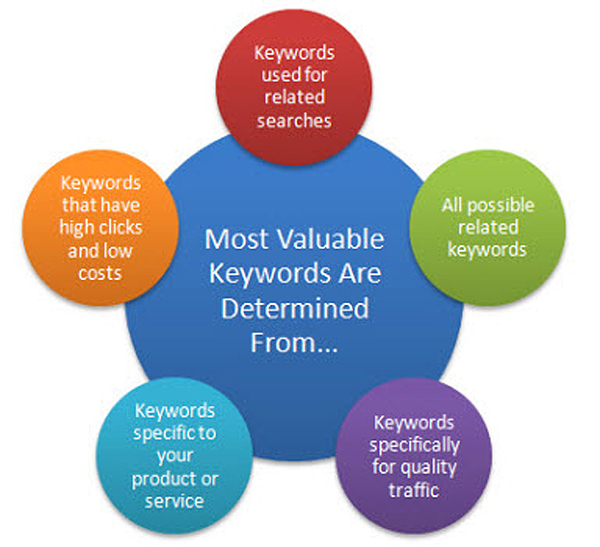
There are already wonderful and amazing tools that do the job for you.
- You can find valuable keywords with seed keywords.
- If you are worried to know how people search for keywords related to your niche, use soovle.
- Wanna get suggestions from Google, Bing, YouTube? Then try Google keyword suggest tool.
- There is always a possibility that you will miss some keywords. Why miss them? Use serpstat.
- You can find low competitive keywords with the help of SEMrush.
#2. Create Long-Form Content Around Those Keywords
Once you are ready with the keywords, start focusing on creating long-form content with those keywords.
Popular bloggers Neil Patel and Brian Clark have always stressed the importance of long-form content.
Content is the king.
If you don’t use proper keywords, your content will not have any value.
Why Develop Long-Form Content?
- For better online visibility.
- To drive massive search engine traffic.
- To get potential customers.
- It generates more leads.
- To increase your brand in the online world.
- To rank your page high in Google search engine.
- It provides quality backlinks.
- It plays a major role in your conversion rate.
- To increase user engagement and draw a huge, highly targeted audience to your blog.
- It entices your audience to stay on your blog for a longer time.
It is recommended that you write at least 1000 words in every post that you publish on your blog.
Remember, never write lengthy content just to stuff keywords in a post.
Always provide useful and informative content.
The content you write must solve the problems of your potential readers.
If they find your post helpful, they will bookmark your page and visit again and again.
If you want to build your email list or sell something, the best way is to write lengthy articles.
Do you know that crazy egg blog saw an increase in its conversion rate by 30 percent… just by writing long-form content?

Tips to Write Long-Form Content:
- Do proper research about the topic that you are going to write.
- Never write lengthy paragraphs in your post. Write just a 3-lined paragraph.
- Use headings and subheadings wherever possible. It provides a clear structure for your readers. It helps them easily navigate through your post. Expand your content under each heading.
- Make sure that you include keywords in the introduction.
- Be unique. Never ever copy the content. Your writing should be in your own voice.
- Don’t cover too many topics in one post.
- If you are specialized in any area, make sure you write about that stuff in your post.
#3. Optimize for the Google “Quick Answer Box”
You may have noticed that when you search for something in Google, apart from the search results, it also shows a “quick answer box” at the top of the page for some queries.
It gives a quick answer to your search query. Google provides the short snippet so that the users need not scroll for lengthy content.
So, the question is how does Google decide what content to display in quick answer box?
Google gets the information from reputable, top high ranking sites that appear in the search results.
Here are Few Ways You can Optimize:
- If the image filename and alt attribute in your blog post match with the search query, there is a potential possibility that your post will be displayed. So, in every blog post, make sure that you make your blog post title, image filename and alt attribute the same.
- Create a summary of the post. For example, if you write a post on “Step-by-step guide to install Ubuntu”… put a summary section in your post.
- Try to answer the complicated questions in your niche area. There are lots of unanswered questions. People look for them. You can write each answer as one separate post and for sure Google will show your page in the answer box. You can use BrightEdge – a tool that gives results for the key phrases that don’t have answers. It’s a paid tool.
- Use a query in the headline and answer it explicitly. And also, give variations of the answer using relevant keywords.
- Make sure that you use all SEO techniques in your content. This will give you the best chance to have your content ranked high and get featured in Google’s quick answer box.
- Implement schema markup code. It is the code that you need to put on your blog for search engines to return to your page for information. With the help of schema markup only, Google identifies what part to use in the answer box. You can know all schema options from schema-creator.org and schema.org
Here are Some More Useful Tips To Help You Optimize for Google’s Answer Box:
- Always upgrade your content. Keep your information up-to date.
- Get more backlinks to your blog.
- Write lengthy content. Increase user engagement. Check #5.
- Do extensive keyword research. Identify topics within your niche. Check whether they have quick answers or not. If not there, take up that topic and write about it on your blog.
- In the introduction, give a one or two line solution.
- Write attractive headlines.
Google’s quick answer box is an incredible place where you can get huge traffic to your blog.
#4. On-Page SEO Plays a Key Role Even in 2017
If you are aiming to explode your search traffic, on-page SEO is the surest technique to deploy.
There are two main factors that help in optimizing your website. One is on-page SEO and the other is off-page SEO. In this post, we will look into on-page SEO.
What is On-Page SEO?
It is the technique that is used to improve your page ranking in the Google search engine search results.
Why On-Page SEO and How it Benefits you?
While ranking your post or website, Google not only looks for your on-page SEO score but also considers your post shares, tweets and domain authority (DA).
When your website is displayed in the first page of the Google search engine search results, it helps bring targeted visitors to your blog.
You should do keyword research (check #1) before jumping into implementing on-page SEO techniques.
Special: Start Your New Blog Today: 3 Easy Steps
Important On-Page SEO Techniques:
#1 Use Primary Keywords in your Page Title
If you don’t write a catchy title, no one reads your post. Your post title acts as an advertisement.
If your post title is attractive, it can generate a high CTR (Click-Through-Rate). Google search engine considers CTR too when displaying your page in the first page search results.
While framing your title, it is important to include your primary keywords. Google highlights those keywords when users search for that result.
#2 Use Targeted Keywords Under Meta-Tags and Meta-Description
Never ignore the inclusion of targeted keywords in the meta-description section. Use calls-to-action like “Grab the deal” or “Learn more” somewhere in the meta-description.
Writing keywords under meta-description also increases CTR (Click-Through-Rate). Never stuff keywords unnecessarily just for the sake of it. It can make users feel like it is spam. That increases the likelihood that they’ll hit the back button which affects your blog’s SEO strength.
Always write unique content of around 135 to 160 characters in the meta description. Make sure that you use all possible relevant target keywords under meta tags section as it describes what your post is about.
#3 Optimize your URL
Always write user-friendly and clear URLs for your blog posts. If you have two posts which talk about similar stuff, search engines consider the one with the most simple and clear URL.
To get best results from search engines, you need to optimize the URL. How you can do it?
- Keep it short, 50 to 60 characters is enough.
- If possible, include your primary keyword in the URL.
- You could use your page title as the URL provided it’s short. For example, say your post is “7 marketing techniques that you should use.” You can keep the URL as yourdomainame.com/marketing-techniques or yourdomainname.com/7-marketing-techniques. But never use irrelevant URL’s.
#4 Optimize Your Images
Without using images in your post, I would say it’s incomplete. One image speaks louder than thousands of words.
If you want your post to be shared massively on Pinterest and Twitter, then include images.
How do you optimize the images? Write alt text for all images because search engines find it difficult to know if your image is relevant without that snippet of text. Use keywords in the image alt text to increase the chances of the image showing up in search results.
Some More Useful Tips:
- Your keywords should appear in the first 100 words of your blog post.
- Use the h2 tag for sub-headings.
- In every blog post, add 2 to 3 internal links. Internal links are the links to previous posts on your blog. Make sure that those are relevant.
- Use social sharing buttons at the end of your post or in the side corner of your blog.
- Write very lengthy content. Check #2.
- Use mobile-friendly, responsive designs for your blog or else your site may be penalized by Google.
- Use images wherever it is necessary. Good images encourage users to spend more time on your site.
#5. Link Out to Notable People, Blogs and Brands
Linking out to influential blogs and top brands drives massive traffic to your blog.
Do you know that most of the brands are now turning to influential and top bloggers to reach a new and expanded audience? To make an income through your blog, you should work with brands.
Always focus on how much value you can provide, not how much money you can make.
If any branded company feels that their product is well received by your readers, though, they could pay you to advertise for them and promote their products through your blog.
Special: Start Your New Blog Today: 3 Easy Steps
How you can do this?
Link building.
Yes, you need to get high quality links for your blog from influential bloggers. You need to grow your blog.
Here are the ways you can do link building effectively:
- Blog commenting. This strategy generates lot of backlinks to your blog. Make a list of the top 30 bloggers in your niche and start leaving thoughtful comments on their blogs.
- Market your stuff excessively in social media.
- Write guest posts for the blogs in your niche and you will start increasing the number and quality of backlinks to your blog.
#6. Don’t Ignore the User Experience
What is the quality of the user experience your visitors have when they interact with your blog? If your blog has awesome content but poor design, it will never work.
That is why blog design is the new king, and content comes next. If the content is not readable or sufficiently visible and everything is confused, not even one reader will show interest in visiting your blog.
What can you do?
- Use heat maps tracking from SumoMe: you can write 2 to 3 line paragraphs for each of these.
- Stop using annoying pop-ups.
- Make your site mobile responsive.
- Make your site load faster.
- Implement SSL certificates.
Make your CTA (Call-To-Actions) clear. What action do you want your reader to take? You should make it easy for a reader to subscribe to your email list or share your content on social media. Make use of available plugins. Integrate them with your blog.
Final Thoughts on Increasing your Search Traffic in 2017
No one gets results instantaneously, especially from search engines. Through consistent effort, though, you can achieve this goal. If you want to make a living out of blogging, you need to drive massive traffic to your sites.
To put it simply, search traffic is the lifeblood of any profitable blog or online business. To get more traffic, you need to consistently implement the few key SEO strategies and techniques I’ve outlined here.

Are you ready to execute the SEO tips from this post?
Do you have any more questions?
Do let me know your thoughts in the comments below.
About The Author
 Anil Agarwal is the guy behind Bloggers Passion blog where he is helping newbie as well experienced bloggers in taking their blog’s search traffic & revenue to the next level. You can connect him on Facebook here.


Comments are closed.