
This post was most recently updated on October 26th, 2020
You can get high quality traffic when you blog with LinkedIn.
Sure, everybody wants to get free traffic from Google.
That’s why most bloggers focus their efforts on SEO (Search Engine Optimization).
They figure, with the right keywords and other SEO tactics, they’ll rank high in the Google search results.
Then, they can just sit back and watch the free traffic roll in.
But considering how crazy competitive that strategy is, you’ve got to ask yourself.
Do you really need Google to get people to your blog?

Well, in this article I’d like to let you know another tool you can use to get free traffic to your blog.
And this is a particularly effective tool for getting high quality traffic.
Blog with LinkedIn
LinkedIn offers you a unique way to connect with leaders in your niche.
It is often considered the prime social media platform for business bloggers.
That’s because companies and thought leaders use it to find collaborators and even employees.
But it’s really good for just about any blogging niche if you can show your relevance to this crowd.
For instance, if your blog is about motivation or self-improvement… these are things that people in any business would value.
If it’s about using social media or creating videos… well, these things, too, could be positioned as key elements to developing business.
In other words, any topic is good for LinkedIn, as long as your content is relevant to the business-oriented crowd.
So, when you blog with LinkedIn, you need to position your content as such.
Blogging on LinkedIn
Now, the best way to get high quality traffic back to your blog from LinkedIn, is to blog on LinkedIn.
That’s because LinkedIn will give your blog posts much higher visibility if they are on the LinkedIn platform.
So, for instance, you can write an article on your own blog.
Then update your LinkedIn status with a link to that blog post.
It may get some visibility with your audience.
Special: Join Donna’s Free VIP Blogging Club – Free Now… Free Forever
But it will get much more if you link to a blog post you published on LinkedIn.
So a big part of what I mean when I suggest you blog with LinkedIn, is to actually write articles on the LinkedIn platform.
Then, embed links back to your personal blog within those LinkedIn articles.
Here’s how I suggest you that.
LinkedIn Publishing
Did you know you can publish articles on LinkedIn?
You use their LinkedIn Publishing feature to do that.
It used to be called LinkedIn Pulse, so don’t get confused by that.
Anyway, here’s how you get started with LinkedIn Publishing.
Go to the “Start a post” screen where you would normally update your status.
Most bloggers would simply link to their latest blog post here, with a link back to their own blog.
This takes LinkedIn readers away from the LinkedIn platform, and sends them to your blog.
But, again, doing this will get you far less visibility than if you use the LinkedIn Publishing feature.
So, when you get to the “Start a post” screen, simply click the “Write article” feature, instead.

This will redirect you to the LinkedIn publishing menu.
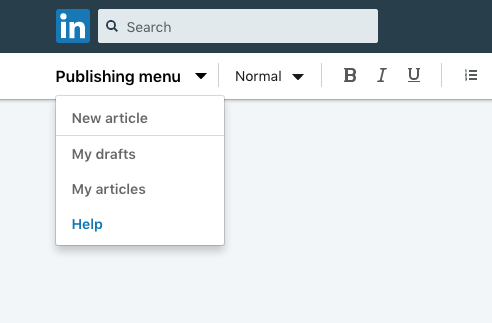
From there, you can start your “New article.”
Or, you can also track down the drafts of articles you have in the works.
And to see articles you’ve previously published via LinkedIn Publishing, you just click on “My articles.”
There, you can see your previous articles, plus analytics for them.
My “blog with LinkedIn” strategy
So, here’s what I have found to work best for getting high quality traffic to your blog with LinkedIn.
Step 1
Publish a blog post on your own blog.
As an example, I once wrote an article about using ebooks to build your business.
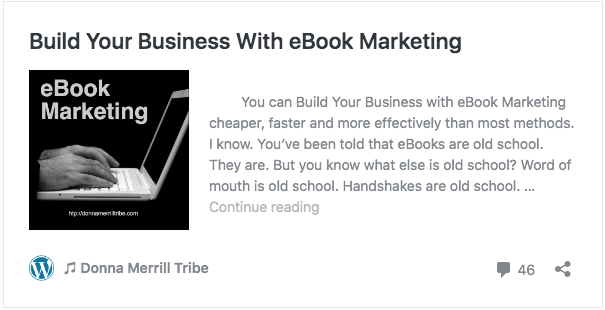 I got a lot of interest from that article.
But many people were telling me they didn’t have the time to write an ebook, so it wouldn’t be a practical strategy for them.
Step 2
Publish a repurposed version of that same blog post on LinkedIn.
I especially had a lot of feedback from business owners and their staff wondering how they could compile an ebook for their business.
So I decided to show people how easy it would be.
But instead of putting that follow-up article on my blog, I published it on LinkedIn to capture the attention of business people, who obviously were struggling with this.
The article was called “Create A 36 Page eBook This Week – My Drop Dead Simple Formula.”

I got many LinkedIn readers to my blog from that article.
Not only that, but I got 2 new clients for my private coaching program the very first day the article went live on LinkedIn.
And I still get clients and readers from it, even though it was several years ago.
These are business people who know an ebook could help them, but had no idea how easily they could create one until they read my LinkedIn article.
So, besides getting more traffic when you blog with LinkedIn, you can even get clients and close deals with LinkedIn.
My formula, then, is this…
- Give good value
- Solve specific problems
- Get new clients
- Get high quality traffic to your blog with LinkedIn
Step 3
Finally, as you do on your own blog, promote your LinkedIn articles.
This will get you more traffic to your LinkedIn articles.
LinkedIn will appreciate that, and show your article to more people.
Special: Join Donna’s Free VIP Blogging Club – Free Now… Free Forever
You will get high quality traffic to your blog for your efforts.
Final notes about blogging on LinkedIn
A few things about making this strategy work.
Link to your blog
First, you need to be sure there is a link connecting your LinkedIn articles to your blog.
You can tell people to “learn more,” for instance, with a link going to your blog post on the same topic.
Make sure you are sending them to a blog post on the same topic.
Otherwise, they might get confused and just click away.
So put a link on your LinkedIn article that will go directly to the blog post you want them to land on.
And don’t just do this with text links.
You can also put up images or even videos that link back to your target blog post.
Do not use your blog post as your LinkedIn article
Notice, in the above example, I mentioned that I “repurposed” my blog post.
Don’t just copy/paste your blog posts as LinkedIn articles.
That’s duplicate content.
It will make LinkedIn unhappy, and unlikely to share much of your work.
It will also mess up your Google rankings and the Domain Authority for your own blog
Repurpose your content to give it a different look and feel.
 For example, take one part of your original blog post.
Examine it in greater detail for your LinkedIn article.
Or maybe tell your LinkedIn readers something additional on the topic.
You could even simply rewrite your blog post from scratch so it would give the same information with different words.
That way it would not be duplicate content.
Promote your LinkedIn article
Don’t expect great results with this strategy if you simply publish a LinkedIn article and walk away.
Like with your own blog posts, you want to link to it on your social media sites, maybe do an accompanying graphic or a video to share.
Do your basic content marketing just like you would with any of your blog posts.

What do you think about this strategy?
Leave me a comment below and let me know.
I know bloggers are accustomed to doing their standard SEO, hoping Google will give their blog post a high ranking.
But this is an alternative method to getting high quality traffic to your blog.
Are you ready to blog with LinkedIn?
-Donna
PS: Please share this article on your social sites 🙂


Comments are closed.